Features
Eliminate recency bias. Build a record of impact.
When review time comes, most people can only remember the last few weeks of work. Six months of execution gets compressed into a handful of recent memories. Workspark's accomplishment tracking solves this. Your team logs achievements as they happen, building a continuous record that feeds directly into performance reviews.
One question. Continuous impact.
Each entry starts with a single question: "What did you accomplish today?" The form is intentionally minimal. A description is all that's required. Title, category, and date are optional and can be filled in by AI. Less friction means more frequent logging, which means richer data at review time.
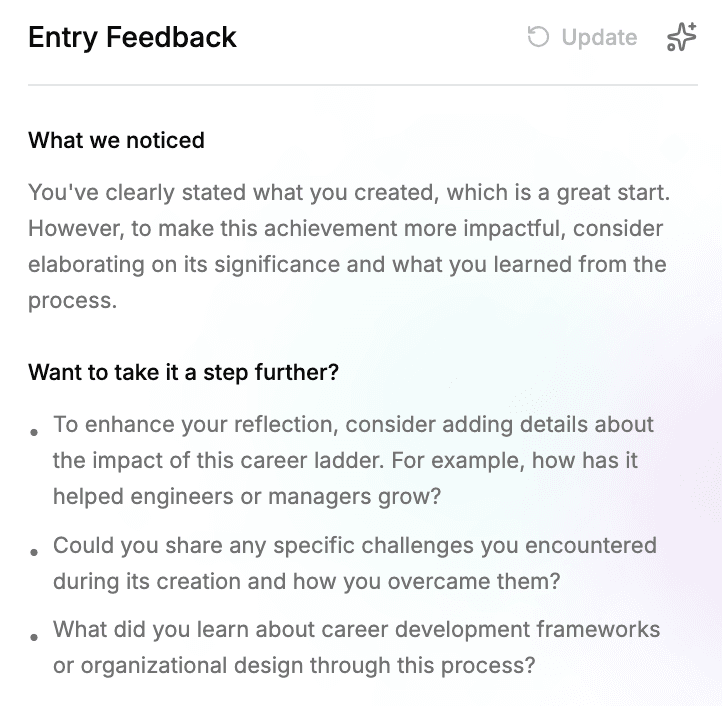
AI-assisted entry writing
As an accomplishment is written, an AI assistant reads the draft and offers targeted suggestions for improvement: where to add impact, where to sharpen a claim, what context is missing. Each entry also gets a quality rating, so it is clear at a glance how strong the draft is.
Quick entries turn into meaningful records with very little extra effort. Over time, everyone builds a natural habit of capturing impact, and reviewers later work from accomplishments that are specific and well written.
See where you're adding value
AI automatically categorizes each accomplishment into one of 9 work categories, so you can see patterns in how you spend your time and where you're making the biggest impact.
Create
Building new features, designing systems
Execute
Implementing, delivering work
Lead
Leadership, mentoring, providing direction
Learn
Training, skill development, education
Maintain
Support, bug fixes, ongoing maintenance
Plan
Strategy, roadmapping, planning activities
Research
Investigation, exploration, analysis
Share
Communication, documentation, knowledge sharing
Support
Helping others, collaboration
See how your work maps to your role
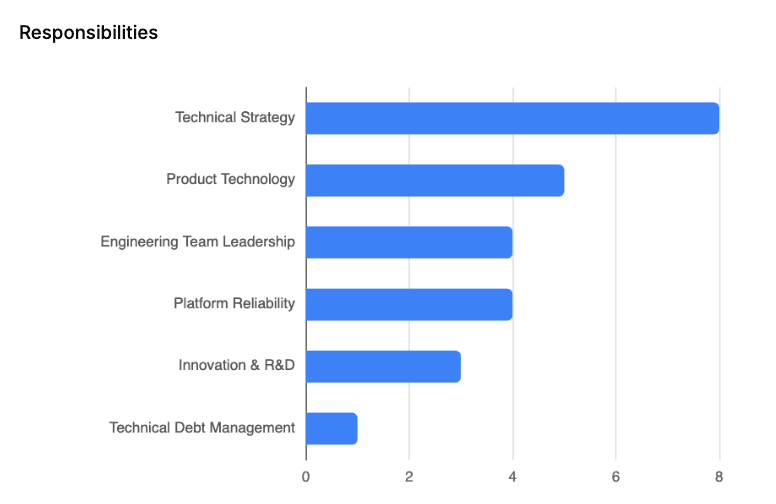
Workspark reads every accomplishment and generates AI insights on how your day-to-day work aligns with your role. See which responsibilities you are leaning into, where the quiet gaps are, and how the mix has evolved over time.
A natural starting point for 1-on-1s, career development conversations, and role scoping discussions. You bring the full picture of the last few months into the room.
Directly integrated into performance reviews
This is where accomplishment tracking pays off. During a review cycle, every accomplishment logged within the review period is automatically surfaced in the review editor.
For employees writing self-reviews
Your accomplishments appear alongside the review form. Instead of trying to remember what you did, you have a complete, categorized record to reference.
For managers writing evaluations
Managers see their direct reports' accomplishments while writing manager reviews. This provides concrete evidence of work performed, reducing reliance on memory.
The result: reviews grounded in evidence
Reviews stop being a recollection exercise and start being a data-backed conversation about performance, growth, and impact.
Frequently asked questions
- How long does it take to log an accomplishment?
- Seconds. The form is centered around a single question: "What did you accomplish today?" Add a description, and optionally a title, category, and date. The form is intentionally minimal to encourage frequent logging.
- How does this eliminate recency bias in reviews?
- When review time comes, most people can only remember the last few weeks of work. Accomplishment tracking creates a continuous record throughout the entire review period, so reviews reflect 6-12 months of impact, not just what happened last Tuesday.
- Do I need to categorize every entry?
- No. Set the category to "auto" and the AI will classify it for you based on the content. There are 9 work categories covering everything from creating and executing to leading and learning.
- How do accomplishments connect to performance reviews?
- Accomplishments logged during the review period are automatically surfaced within the review editor. Employees reference them in self-reviews, and managers can see their direct reports' accomplishments while writing evaluations. Reviews are grounded in concrete evidence rather than memory.
- Can managers see their team's accomplishments?
- Yes. Managers have visibility into their direct reports' accomplishments, making it easy to stay informed and provide comprehensive, fair performance reviews. People Operations can see all accomplishments across the organization.